
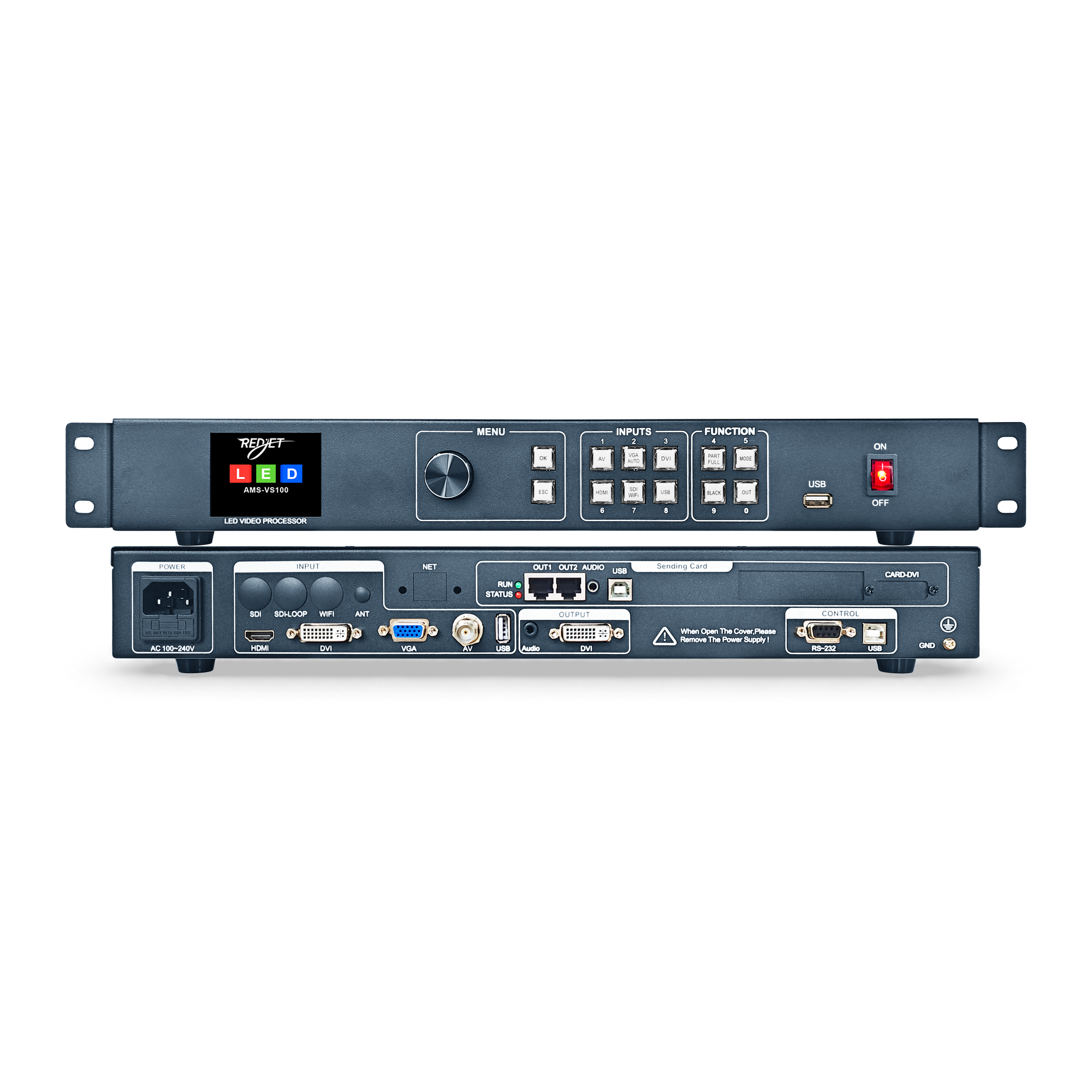
Description
REDJET VS100 Series
Your sources. One clear workflow.
A versatile LED video processor family for wired video, USB media playback and seamless source switching. Start with the shared platform, then choose remote-control support, SDI connectivity or Wi-Fi display to suit your setup.
Built into every model
- Five core inputs
HDMI, DVI, VGA, composite AV and USB media playback. - 10 saved setups
Store and recall source, display and image settings for repeat use. - Direct front-panel control
LCD, rotary control and dedicated source keys with signal-status indicators. - Practical show controls
Seamless switching, full or partial picture, key lock and assignable black-screen or freeze operation.
Four models, clearly defined
VS100
Standard
The shared wired-input and USB playback platform.
VS100R
Remote control
Adds remote-control support.
VS100S
SDI input & loop
Adds SDI input and an SDI loop connection.
VS100W
Wi-Fi wireless display
Adds wireless display using IEEE 802.11n.
These are separate model options; the additional features are not cumulative.
Technical specifications
Explore the connections, controls and installation requirements below.
Video inputs & supported signals
| HDMI | 1 input. Documented video formats: 480i/p, 576i/p, 720p and 1080i/p. Documented colour depth: 8, 10 or 12 bit. |
|---|---|
| DVI | 1 input. VESA signals up to 1920 × 1080 at 60 Hz. DVI-I input connector; the manual lists DVI-I and DVI-D cables. |
| VGA | 1 input. VESA signals up to 1920 × 1080 at 60 Hz. Automatic image correction and manual position, width and clock-phase adjustment. |
| Composite AV | 1 BNC input. PAL, NTSC, PAL-M/N and SECAM signal support. |
| USB media | USB picture and video playback. Player settings include photo effects, delay and repeat mode. |
Input resolution describes accepted source signals. It does not establish the pixel capacity or output resolution of the complete LED system.
Video output & LED display setup
- DVI output: one programmed DVI video output for a compatible LED sending card or display.
- Image placement: output settings include horizontal width, vertical height, horizontal position and vertical position.
- Full / partial image: display the full source or a defined area using the FULL/PART controls and user-adjustable capture settings.
- Sending-card configuration: the fitted card determines LED network outputs and receiving-system compatibility. Confirm the supplied configuration before specifying screen capacity.
The supplied documents disagree on maximum output resolution, sending-card quantity and RJ45 port count. A fixed maximum resolution or network-port count is therefore not stated as a confirmed specification for this product.
Image processing & source management
- Seamless switching between supported source channels.
- Image controls for brightness, contrast, colour saturation and sharpness.
- VGA automatic adjustment, plus manual horizontal/vertical position, horizontal width and clock-phase controls.
- The function menu lists EDID management, audio settings and source backup; the supplied manual does not specify every operating mode for these items.
- Source-key indicators distinguish no signal, signal detection and an active connection.
Presets, front-panel controls & settings memory
- 10 preset memories: save and recall source selection, display parameters and image settings.
- Preset access: recall through the preset menu or MODE shortcut; the menu also supports save and erase operations.
- Settings retention: current user parameters are stored in EEPROM and retained after power is removed.
- BLACK key: assign either black screen or freeze in the function menu, then operate it with the front-panel button.
- Key lock: helps prevent accidental changes. The manual describes holding OK for five seconds to unlock.
- LCD and rotary control: navigate and confirm menu settings using the rotary control, OK and ESC.
USB playback & audio
- Play pictures and videos from USB media.
- Photo playback controls include effect selection, delay and repeat mode.
- Audio/video synchronized output is documented for USB and HDMI, and for SDI on the SDI-equipped model.
- The manual lists a 3.5 mm stereo audio output.
Supported file systems, codecs, maximum media-playback resolution and complete audio routing are not specified in the supplied documents; verify your intended media and signal path before use.
Model-specific connections
- VS100: standard core-input configuration.
- VS100R: remote-control support. The supplied documents do not confirm remote accessory inclusion or operating range.
- VS100S: SDI input and SDI loop. Confirm the required SDI signal format against the supplied unit.
- VS100W: Wi-Fi wireless display, IEEE 802.11n. Casting protocol, supported operating systems and pairing procedure require confirmation for the supplied unit.
Power, operating environment & weight
- Power input: 100–240 V AC, 50–60 Hz, with internal power supply. Follow the rating label on the actual unit.
- Operating temperature: 0 to +50 °C.
- Storage temperature: −40 to +70 °C.
- Humidity: 10–90% RH, non-condensing, for operation and storage.
- Literature weight: 3.0 kg net and 4.0 kg packed. Confirm the shipped configuration and packaging for freight planning.
Use a grounded power supply and keep ventilation openings clear. Internal servicing must be carried out by qualified personnel.
Installation details to confirm before ordering
- Fitted sending-card model and quantity, RJ45 output count, total pixel capacity and receiving-system compatibility.
- Required output resolution and refresh rate for the complete LED system.
- Actual enclosure dimensions, rack clearance and package dimensions; the available records contain conflicting measurements.
- Included cables and accessories, the remote accessory for VS100R, and the casting protocol for VS100W.
Specifications above are compiled from the supplied VS100 series brochure and user manual. Configuration-dependent or contradictory values are identified explicitly.